We had one issue where people tend to create adapter classes inside fragments as properties and then forget to clear them out in onDestroyView. This actually creates a memory leak due to the adapter very often holding references to objects that were already destroyed. To prevent this from happening, we decided to create a custom lint rule that detects if you have an adapter field in your fragment class and warns you that it should be part of onCreateView instead.
I started digging into how to create a lint rule for Android and there are some tutorials out there, but most of them were out of date and using some old ways. So this is how I created ours:
Lint module
First of all, you need to add a lint module to your project. In our case it is called lint-rules. The project build.gradle file looks like this:
plugins {
    id "java-library"
    id "org.jetbrains.kotlin.jvm"
}

java {
    sourceCompatibility = JavaVersion.VERSION_17
    targetCompatibility = JavaVersion.VERSION_17
}

dependencies {
    compileOnly libs.lint.api
    compileOnly libs.lint.checks
}
The lint.api and lint.checks dependencies have the following version set:
lintVersion = "31.4.0"

lint-api = { module = "com.android.tools.lint:lint-api", version.ref = "lintVersion" }
lint-checks = { module = "com.android.tools.lint:lint-checks", version.ref = "lintVersion" }
The overall project structure looks like this:

Detecting new lint rules
So the file inside META-INF.services package points to the CustomLintRegistry above it, the content is the following:
<my package>.lintrules.CustomLintRegistry
So the idea is that lint will check this file and pick up your CustomLintRegistry and the rules that it exposes by checking this file.
Warning in lint
Lint warns the user whether the code he has written is good or not. The warning has different data like:
- Suggestions how to replace the code
- Explanation why is it wrong
- Code sample
So what you will need to do is to create an issue object, similar to the one below:
object AdapterUsageIssue {

    private const val ID = "AdapterUsageIssue"

    /**
     * The priority, a number from 1 to 10 with 10 being most important/severe
     */
    private const val PRIORITY = 9

    private const val DESCRIPTION = "Adapter variable will cause a memory leak."

    private const val EXPLANATION = """
        Using adapter as an immutable val property inside the fragment means that the adapter will outlive the
        fragment and will hold up resources and cause memory leaks. To fix this issue, just make sure you create
        the adapters in onCreateView and don't keep them as a member val.
    """

    private val CATEGORY = Category.CUSTOM_LINT_CHECKS
    private val SEVERITY = Severity.WARNING

    val ISSUE = Issue.create(
        ID,
        DESCRIPTION,
        EXPLANATION,
        CATEGORY,
        PRIORITY,
        SEVERITY,
        Implementation(
            AdapterUsageIssueDetector::class.java,
            Scope.JAVA_FILE_SCOPE,
        ),
    )

    class AdapterUsageIssueDetector : Detector(), SourceCodeScanner {
        override fun getApplicableUastTypes(): List<Class<out UElement>> =
            listOf(UClass::class.java)

        override fun createUastHandler(context: JavaContext): UElementHandler =
            AdapterUsageVisitor(context)
    }
}
Detecting the targeted files - Fragments
As you can see from above, our issue has a link to a something called Detector - a class responsible to detect files that we are interested in the code. This class then delegates to our Visitor one, who will be responsible for holding the logic for the wrong adapter detection.
You also probably saw that we are targeting all classes in the project. This is what listOf(UClass:class.java) means.
You could skip the Visitor class implementation because the detector already has some overrides that you can use like:
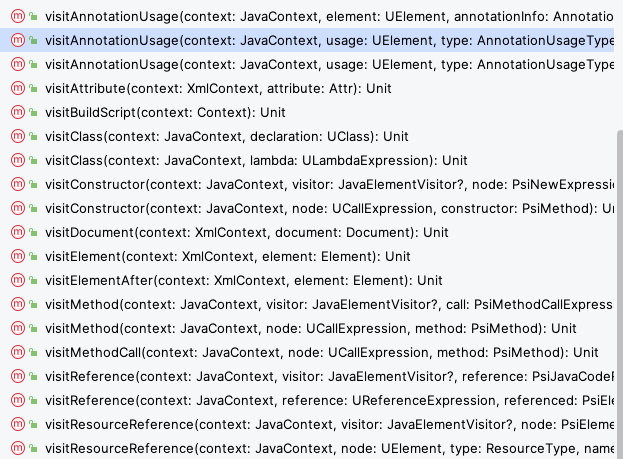
You could easily override any of these methods and do the logic check there. But in my case, I decided I want to move it to a separate class, that does the logic handling.
Detecting the issues in the code
class AdapterUsageVisitor(private val context: JavaContext) : UElementHandler() {
    override fun visitClass(node: UClass) {
        if (node.isFragment()) {
            node.fields.forEach { fieldNode ->
                if (hasAdapterField(fieldNode)) {
                    val fieldType = fieldNode.type
                    if (adapterExtendsRecyclerviewAdapter(fieldType)) {
                        reportIssue(fieldNode)
                    }
                }
            }
        }
    }

    private fun UClass.isFragment() = javaPsi.name?.contains("Fragment", ignoreCase = true) == true

    private fun adapterExtendsRecyclerviewAdapter(fieldType: PsiType) =
        fieldType.superTypes.any { it.toString().contains("adapter", ignoreCase = true) }

    private fun hasAdapterField(fieldNode: UField) = fieldNode.name.contains("adapter", ignoreCase = true)

    private fun reportIssue(node: UField) {
        context.report(
            issue = AdapterUsageIssue.ISSUE,
            scopeClass = node,
            location = context.getNameLocation(node),
            "Move the adapter inside onCreateView to prevent memory leaks",
        )
    }
}
The code above is the simplest but ugliest solution I came up with. It:
- Checks if class name contains Fragment
- Checks if fields names contain adapter
- Checks if the adapter type contains “Adapter”
Then we highlight the field saying that it should be moved inside the onCreateView method and not have it as a field in the Fragment.
Several things could be improved here:
- Check if the class extends from Fragment
- Check if the adapter field type extends from RecyclerView.Adapter
But I didn’t have much time to dig into it and figure out how you can check the hierarchy of a type. Maybe someone can leave a comment and a suggestion how to achieve that?